
An insider incident can be deletion, not theft
Two school district employees in Texas were arrested this week over the alleged deletion of police records. Nothing left the building. Insider programs are built to watch the door, and the harder case is the one where the evidence simply stops existing. Here is how that case is investigated, and what to preserve before anyone touches anything.
- In Lamesa, Texas, the allegation is not that data was taken. It is that records were made to disappear. One arrest is for breach of computer security, the other for criminal responsibility for the conduct of another.
- Insider programs spend most of their effort on files leaving the company. Deletion is the one act that exfiltration monitoring is designed not to see.
- A deleted record leaves traces in half a dozen places, each with its own clock. Several are gone within weeks by default, and careless remediation can destroy the rest.
- Investigating deletion is reconstruction: what existed, when it stopped existing, under whose session, from which device, and whether anyone tried to cover it. Preserve first, restore second.
On 10 September 2026 the Lamesa Police Department in West Texas, with help from the Texas Rangers, arrested two employees of the Lamesa Independent School District. The district's statement was careful, and the careful part is the point: the allegations involve "the alleged deletion of records typically maintained by law enforcement", and "do not involve the disclosure or compromise of district data".
Nothing left. Nothing was copied to a USB stick or a personal Gmail account. If the allegations hold, the insider act was subtraction.
Every insider threat program I have seen is built to watch the door. This is what happens when the incident never goes near it.
What was reported
According to KCBD and local reporting, one employee, 54, was arrested at around 5 p.m. on 10 September on a charge of criminal responsibility for the conduct of another. A second, 40, was arrested about forty-five minutes later in Stanton on a charge of breach of computer security. The district said there is no indication that student or staff safety was involved, no indication of financial impropriety, and that it would not comment further while the investigation is active.
The roles of the two employees have not been reported, and neither has the system the records lived in. What has been stated is the shape of the case: records of the kind a police department keeps, allegedly deleted, and two people charged in a way that suggests one is accused of doing it and the other of causing it to be done.
These are allegations. Both men are presumed innocent unless and until proven guilty. But the shape is familiar to anyone who has worked these cases, and it is worth taking seriously on its own.
The act that monitoring cannot see
Ask any security team what their insider program does and the answer is some version of the same thing: it watches data leaving. Data loss prevention on the endpoint, on mail, on the cloud drives. Alerts on bulk downloads, on personal accounts, on USB devices. All of it is pointed outward, at the moment a file crosses a boundary.
Deletion crosses no boundary. A record that is removed from a system generates no upload, no attachment, no download, no USB event. To the tooling that was bought to catch theft, it looks like an ordinary day. The one insider act that leaves the organization worse off than theft is the one its tools are designed not to notice.
The motives are also different, and older. Theft is about taking something to somewhere else. Deletion is about making something never have happened: a record that names someone, a complaint, a log of who did what, a report that contradicts a version of events. In a police department, or a school district's police department, those records are the point of the institution. Their absence is not a data incident. It is the incident.
Notice the second charge in Lamesa. Criminal responsibility for the conduct of another is the allegation that one person caused another to act. That is the same pattern as the Headlands case from earlier this month, where the accused is alleged to have told his own staff to delete communications and source history. Deletion is very often a two-person act: one who wants the record gone and one who has the access to remove it. Which means the investigation has two identity trails and, usually, a conversation between them.
A deleted record leaves more traces than people think
The instinct when something has been deleted is that the evidence is gone. It rarely is, at least not on day one. A record that is removed from a modern system leaves traces in six or seven places, and each of those places has its own clock.
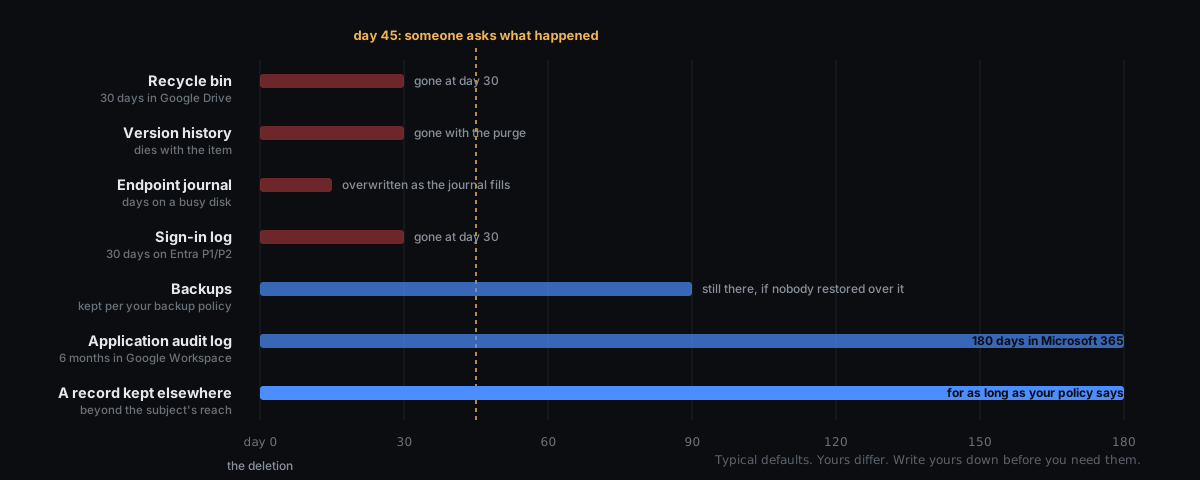
- The recycle bin, or soft delete. Most SaaS platforms and most operating systems do not destroy a deleted object at once. They hide it for a set period, then purge it: 30 days in Google Drive's trash, 93 days in a SharePoint or OneDrive recycle bin. Inside that window the record itself is recoverable, with its metadata.
- Version history. Documents in Google Workspace, SharePoint and OneDrive carry their prior versions. This is how you show what the record said before it was edited or emptied, not only that it was removed. It dies with the item when the purge runs.
- The application audit log. Google Workspace, Microsoft 365, and most records systems log a delete event with the actor, the object, the time and often the IP address. By default Google Workspace keeps its Drive, admin and user log events for six months, and Microsoft 365 keeps audit records for 180 days, or a year for its core services on E5. Longer takes a higher tier or an export.
- The identity sign-in log. Who was signed in, from where, on which device, at the minute the delete happened. Microsoft Entra keeps sign-ins for seven days on the free tier and 30 days on P1 or P2. It is the trace that binds a delete event to a person and a place, and it is usually the first to expire.
- The endpoint's filesystem journal. On Windows the NTFS change journal and the transaction log record file creations and deletions up to a set maximum size, after which the oldest entries are trimmed. On a busy machine that can be days. On a Mac the picture is similar. This is how an examiner shows that a file existed, was renamed, and was removed, even after it is gone.
- Backups and snapshots. Daily backups, database snapshots, volume shadow copies. They establish last-known-good: the state of the record before the deletion, and therefore exactly what was deleted.
- Surrounding behavior. What the same account searched for, opened and exported in the days before. Whether two accounts were active on the same records in the same hour. What was said between two people in the same window.
The chart above uses typical defaults. Yours differ, and the only way to know is to write them down, per system, before you need them.
The first hour, and what not to do
The most common way a deletion case is lost is not that the evidence expired. It is that a well-meaning administrator destroyed it in the first hour while trying to help.
- Do not restore from backup over the live system. Restoring overwrites the very object whose current state, timestamps and absence you need to document. Restore to a separate location, or restore only after the live state has been captured.
- Do not "undelete" from the recycle bin as your first move. Recovering the object changes its metadata and, in some systems, writes a new event over the one you want. Capture the bin's contents and the delete events first, then recover.
- Do not sign in as the user. It adds sessions to the identity log you are about to rely on and muddies the question of who did what.
- Disable accounts, but do not wipe devices. Removing access is prudent. Reimaging a laptop destroys the filesystem journal and the local caches that show what was done from it.
- Export the logs today. Audit logs and sign-in logs are the traces with the shortest clock. Export them in full, note the time of export and who ran it, and store them somewhere the people under review cannot reach.
- Place holds. Mailbox and drive holds in Microsoft 365 or Google Workspace stop the purge. They are one click and they are reversible.
- Write down what you did. Every action you take from the moment of suspicion is part of the record. An investigator will need to separate your footprints from theirs, and so will a court.
Timestamps deserve a sentence of their own. Created, modified, accessed and deleted are four different clocks on one object, they are recorded in different time zones by different systems, and clocks drift. A conclusion that says a record was deleted at 14:07 has to say which clock, and why that clock can be trusted.
Reconstructing it
With the evidence preserved, the investigation is a reconstruction, and it answers a short list of questions in writing.
- What existed. From backups, snapshots and version history: the set of records as they stood before, and therefore precisely what is now missing.
- When it stopped existing. From the application audit log and the filesystem journal: the delete events, in order, with their timestamps reconciled to one clock.
- Under whose session. From the identity log: which account, authenticated how, from which IP and device, at those minutes. Not "whose credentials" but whose session, because the difference is the whole case when two people are charged.
- From which device. From the endpoint: whether the deletes were performed from the machine assigned to that person, and what else that machine was doing.
- What came before. From the surrounding record: searches for the same records, views of them, exports of them, in the days prior. Deletion is rarely the first touch. Someone usually reads what they are about to remove.
- Whether anyone covered it. Cleared browser history, an emptied recycle bin, a second delete of the audit export, a message asking someone else to do it. Cover-up attempts are, in practice, the clearest evidence of intent an examiner ever gets.
The output is a signed conclusion: what was deleted, when, by which account from which device, whether it was recovered and from where, what was done to conceal it, and what could not be determined and why. The last item matters as much as the others. A conclusion that overstates certainty is worse than one that names its gaps.
Where Excavate fits
Most traces in the chart above live inside systems the people under review can reach, and most expire before anyone asks. Coverage exists to change that. Excavate connects read-only to the cloud systems and applications an organization already runs, identity, files, mail and the records systems, and keeps their activity in a tamper-evident record outside the reach of the people it covers, until you choose to delete it. When the question is "what disappeared, and who made it disappear", the delete events, the sessions and the behavior around them are already held. The laptop's own journal comes from a collection on a case, which is why IT should hold the device. A named examiner writes the conclusion.
If your program is built to watch the door, see what coverage reads that a door cannot show, or bring us the systems you run and we will tell you which of these traces you would still have at day 45.